
Jun 5, 2026
#1 Prepare Your Daily AI Toolkit
| # | Model / Tool | Description |
|---|---|---|
| 1 | ChatGPT | One of the most popular AI Large Language Models |
| 2 | HedgeDoc.pro | Simple and easy-to-use collaborative online Markdown editor |
| 3 | Sublime Text Editor | Optional: Free Markdown editor, great for writing prompts |
| 4 | Markdown Cheat Sheet (Online) / Markdown Cheat Sheet (Download) | Recommended: Read and bookmark. The downloaded file can be opened with Sublime above |
#2 The Language for Effective AI Communication – Markdown Basics
Markdown is a lightweight markup language that uses simple symbols for formatting, letting writers focus on content rather than layout. The following are the most commonly used syntax when writing prompts:
| Syntax | Markdown | Effect |
|---|---|---|
| Heading | # Heading / ## Level 2 |
1-6 # signs for heading levels 1-6 |
| Bold | **bold** |
bold |
| Italic | *italic* |
italic |
| List | - item or 1. item |
Bullet list / Numbered list |
| Link | [link text](URL) |
Clickable link |
| Code | `code` or ```code block``` |
Inline code / Code block |
| Quote | > quoted text |
Blockquote |
| Divider | --- |
Horizontal rule |
| Table | | Col | Col ||------|------|| Cell | Cell | |
Use pipes to separate columns; second row separates header from content |
#3 Markdown Example
Guess what language this webpage is written in?
Create a new file in HedgeDoc.pro, then in the top-left corner find the “View (eye icon) / Both (two-column icon) / Edit (pencil icon)” view options.
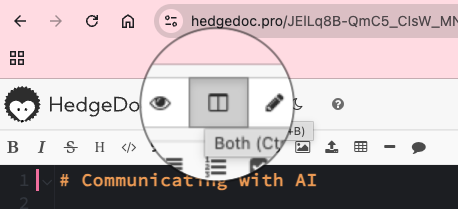
Select the “Both” view (two-column icon) in the middle, then paste the following Markdown code into the left black editing area.
# Communicating with AI
## #1 Prepare Your Daily AI Toolkit
| # | Model / Tool | Description |
|------|------------|------|
| 1 | [Qwen](https://chat.qwen.ai) | Recommended for China: 1. Unlimited traffic 2. Low token price on Bailian platform 3. Reasonably smart |
| 2 | [HedgeDoc.pro](https://hedgedoc.pro) | Simple and easy-to-use collaborative online Markdown editor |
| 3 | [Sublime Text Editor](https://www.sublimetext.com/download) | Optional: Free Markdown editor, great for writing prompts |
| 4 | [Markdown Cheat Sheet (Online)](https://www.markdownguide.org/cheat-sheet/) / [Markdown Cheat Sheet (Download)](https://www.markdownguide.org/assets/markdown-cheat-sheet.md) | Recommended: Read and bookmark |
---
## #2 The Language for Effective AI Communication - Markdown Basics
Markdown is a lightweight markup language that uses simple symbols for formatting, letting writers focus on content rather than layout.
| Syntax | Markdown | Effect |
|------|--------------|---------|
| Heading | `# Heading` / `## Level 2` | 1-6 # signs for heading levels 1-6 |
| Bold | `**bold**` | **bold** |
| Italic | `*italic*` | *italic* |
| List | `- item` or `1. item` | Bullet list / Numbered list |
| Link | `[link text](URL)` | Clickable link |
| Code | `` `code` `` or ` ```code block``` ` | Inline code / Code block |
| Quote | `> quoted text` | Blockquote |
| Divider | `---` | Horizontal rule |
| Table | `| Col | Col |``|------|------|``| Cell | Cell |` | Use pipes to separate columns |
You will see a result like this:
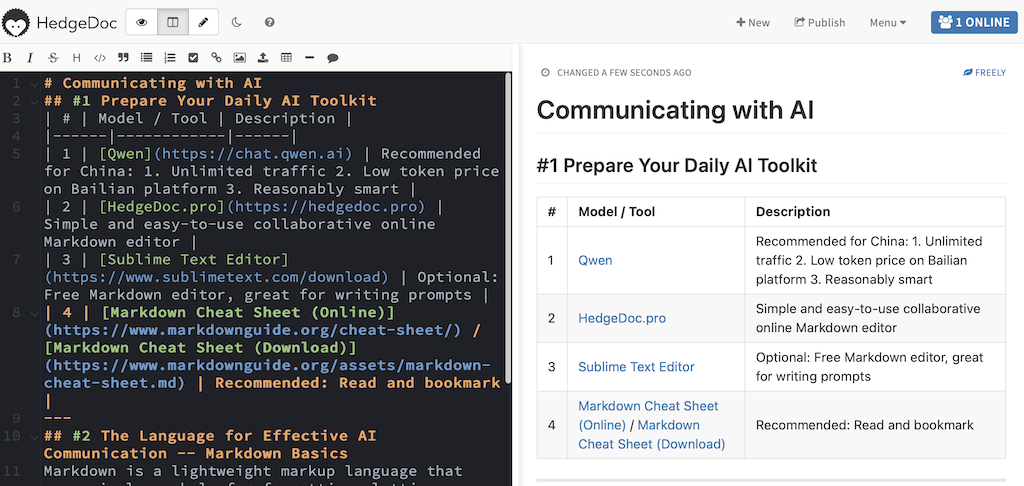
1. Compare the code on the left with the rendered content on the right
2. Try editing the code on the left and watch the right side update
Exercise:
Rewrite the following product requirements using Markdown syntax:
AI Story Chain - Product Requirements
This is a web app for AI-assisted story relay. The user and AI take turns adding to a story, building it together sentence by sentence.
First, the user clicks "Create Story" - no input needed. The AI automatically generates a story opening and waits for the user to continue.
Then the user writes a new plot segment (50 words or fewer) and enters their name (typed manually). After submitting, the AI immediately continues the story, then waits for the next user's turn.
The AI's content should be interesting: surprising twists and dramatic turns. AI-authored segments are labeled "AI".
The homepage needs a story list sorted by time. Each story has a genre tag (like "Thriller" or "Romance", auto-generated by AI), a one-line AI-generated summary, and a segment count. Show an empty state when there are no stories.
Clicking a story opens the detail page with all segments visible and an input at the bottom to continue writing.
The detail page has a "Restart" button. Clicking it shows an inline confirmation (no modal dialogs). After confirmation, the story is cleared and the AI generates a new opening.
#4 Writing Prompts
Essential for Mastering AI – The STAR Framework for Effective Prompts
| Element | Core Question | Recommended Length | Common Mistakes | Best Practices |
|---|---|---|---|---|
| S – Situation | Who? What context? What are you doing? Why do you need AI? | Under 100 words | Written like a resume | • No instructions: don’t include task directives — only describe the context • Only write facts relevant to the task • Use {}: use {paste full background and concept} as a placeholder for dynamic input |
| T – Task | What should AI do? What should it produce? | Under 120 words | Vague instructions like “help me write a script” | • Clear, specific, unambiguous instructions • Decompose: one instruction per sentence • Verb-driven: lead with action verbs • Key requirements: add key descriptions (e.g. SMART principles) |
| A – Action Role | Who should AI act as? What skills should it have? | Under 200 words | Just writing “you are an expert in some field” | • Professional role: specify a role with skills relevant to the task • Domain knowledge: emphasize the expertise the model should have |
| R – Rule | What input is expected? What output? Format constraints? | Under 120 words | Ignoring format constraints, leading to verbose or messy output | • Specify clear, consistent rules • Instantiate: give examples to help AI understand • Clear boundaries, e.g. “must provide at least three scenarios” • Quality requirements: state them explicitly • Templates: specify sentence structure or output template • Output format: e.g. plain text, text block, etc. |
#5 Try the Following Prompt
# S -- Situation
## I am a Scrum Product Owner for a software product, and I am familiar with BDD and ATDD.
## I need to convert natural language requirements into high-quality user stories and acceptance criteria written in Gherkin.
## I want the output to follow a consistent format, naming convention, and numbering convention, so that the team can collaborate, review, develop, test, accept, and trace requirements efficiently.
## The goal is to ensure that each user story is tightly linked to its corresponding acceptance criteria, with a structure that is clear, readable, testable, executable, and traceable.
# T -- Task
## Convert the natural language requirements I provide into structured user stories and acceptance criteria.
## Output the result in the format of one user story followed by all of its related acceptance criteria.
## Ensure that the result is suitable for requirements analysis, development collaboration, test design, and acceptance review.
# A -- Action Roles
## You are a BDD / ATDD expert who is skilled at structuring requirements and producing high-quality user stories and Gherkin acceptance criteria.
## You have both product and testing perspectives, and you ensure coverage of key paths, exception flows, and boundary cases.
## You are proficient in clear and professional English writing, and your output must be clear, standardized, executable, and easy to review.
# R -- Rules
## When generating user stories and acceptance criteria, strictly follow the format, naming conventions, and numbering conventions below.
## User story format requirements
### Template:
US[Number] -- [Short Title]
As a [Role], I want [Goal], so that [Value]
### Requirements:
* The role must be clear
* The goal must be actionable
* The value must be explicit
* Each user story must express only one core goal
### Naming convention:
* Use "verb + object", such as "User Login" or "Submit Order"
* Use business language and avoid technical jargon
### Numbering convention:
* Use US001, US002, and continue incrementally
* The number must be globally unique
* The number may be extended by module, such as AUTH-US001
## Acceptance criteria format requirements
### Basic structure:
Feature: [Feature Number] [Feature Name]
Scenario [Number]: [Scenario Name]
Given [Precondition]
When [Triggering Action]
Then [Expected Result]
And [Additional Result]
### Requirements:
* Use the Given-When-Then format
* Each Scenario must describe one scenario only
* Cover normal flows, exception flows, and boundary cases
* Each Scenario must be testable and unambiguous
### Naming convention:
* Feature: module + function
* Scenario: behavior + result
### Numbering convention:
* Feature: F001, F002, and continue incrementally
* Scenario: S001, S002, and continue incrementally within each Feature
* Combined references may be used, such as F001-S001
## Output structure requirements
### Output in groups of "user story + its acceptance criteria":
User story:
US[Number] -- [Title]
* As a xxx
* I want xxx
* So that xxx
Acceptance criteria:
Feature: F[Number] [Name]
Scenario S001: xxx
Given xxx
When xxx
Then xxx
Scenario S002: xxx
xxx
User story:
xxx
Acceptance criteria:
xxx
## Each group must include:
* Normal flow
* Exception flow
* Boundary case
## Do not output explanations. Output only the result.
# Example
User story:
US001 -- User Login
* As a registered user
* I want to log in to the system using my email and password
* So that I can access my personal account
Acceptance criteria:
Feature: F001 Authentication -- User Login
Scenario S001: Login succeeds with valid credentials
Given the user is registered and the account exists
When the user enters the correct email and password and clicks Login
Then the system should allow the user to log in
And the system should redirect the user to the user home page
Scenario S002: Login fails with an incorrect password
Given the user is registered and the account exists
When
#6 Exercise
Convert the following product requirements document into a user story map.
# SingaHai Travel Buddy
## Purpose & Background
The goal of this project is to create an app that helps travelers enjoy a smoother and more fun trip between Singapore and Shanghai. Modern people are too busy to plan, so the app should handle food, lodging, sightseeing, and transport all at once.
The app should feel smart, trendy, and intuitive---like a personal travel soulmate. Expansion to other cities is possible in the future.
## First Draft Thoughts
* We want to make a travel app that helps people plan their trips, including where to stay and what to eat. Everyone is busy these days, so the app must be easy to use.
* The app should make people want to travel when they open it. Design must feel inspiring. Colors should be bright, youthful but not childish.
* There should be a schedule feature. Users can choose things or we can plan everything for them. So they don't have to think too much.
* There should be a quiz, like a personality test. Then they know what kind of traveler they are and we can suggest better things.
* Food is very important too. Some people are vegetarian, halal, or don't eat spicy. Restaurants must be clean, photogenic, and not expensive.
* Hotels should be close to the attractions, or traveling will be tiring. Price should be okay. Photos must look comfortable. Not noisy.
* Must have maps. Otherwise people will get lost. Navigation would be nice. Show distance and time.
* The app should have everything, but not be too complicated. Preferably, everything is on one page. Slide and done.
* The most important thing is that the app feels convenient, modern, fun---like a friend helping you travel.
## Notes
* I'm not really sure how to write "requirements," but we just want the app to be good-looking, fun, and useful. Everyone's excited.
* Fewer buttons are better, but also can't have too few functions.
* Recommend stuff, but let people change it too. Otherwise they keep asking customer service.
* Oh right, can we add weather? Don't plan too many outdoor things if it's raining.
* Maybe some reminders, like "make reservation for tomorrow" or "wake up early for tour."